Networking Basics
This section will introduce some critical concepts about the current structure of computer networks, and show you how to understand your own network.
A network is simply 2 or more computers linked together via a network interface for the purpose of communication. A computer is often called a ‘host’ or ‘node’ on a network. Here is the simplest network, 2 nodes (desktops in this example) linked by an ethernet cable:
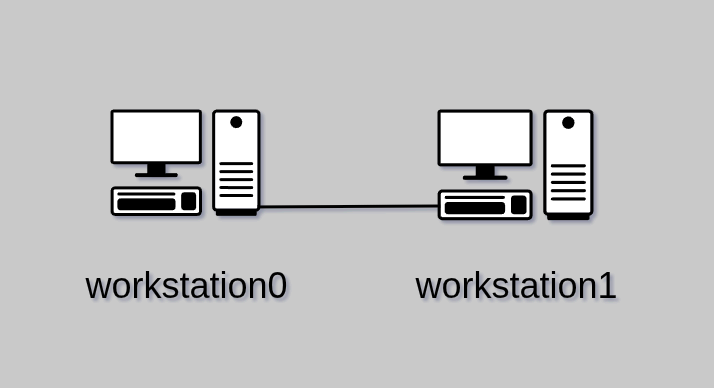
Each of these has a Network Interface Card (NIC) with an ethernet port that the cable plugs into. Each host is identified with a ‘hostname,’ in this case: workstation0 and workstation1. These two nodes now share a direct link, and may pass data back and forth with each other.
Local Area Network (LAN)
This model is overly simplistic, so let’s look at a network that you will be more familiar with. Starting from the top we have a modem, router, and under that a hub, through which the two desktops are now connected. Again, the lines between all these devices represent ethernet cables. For our example, all of these devices are considered ‘local,’ and we call this a Local Area Network (LAN). We’ll learn more about LANs shortly.
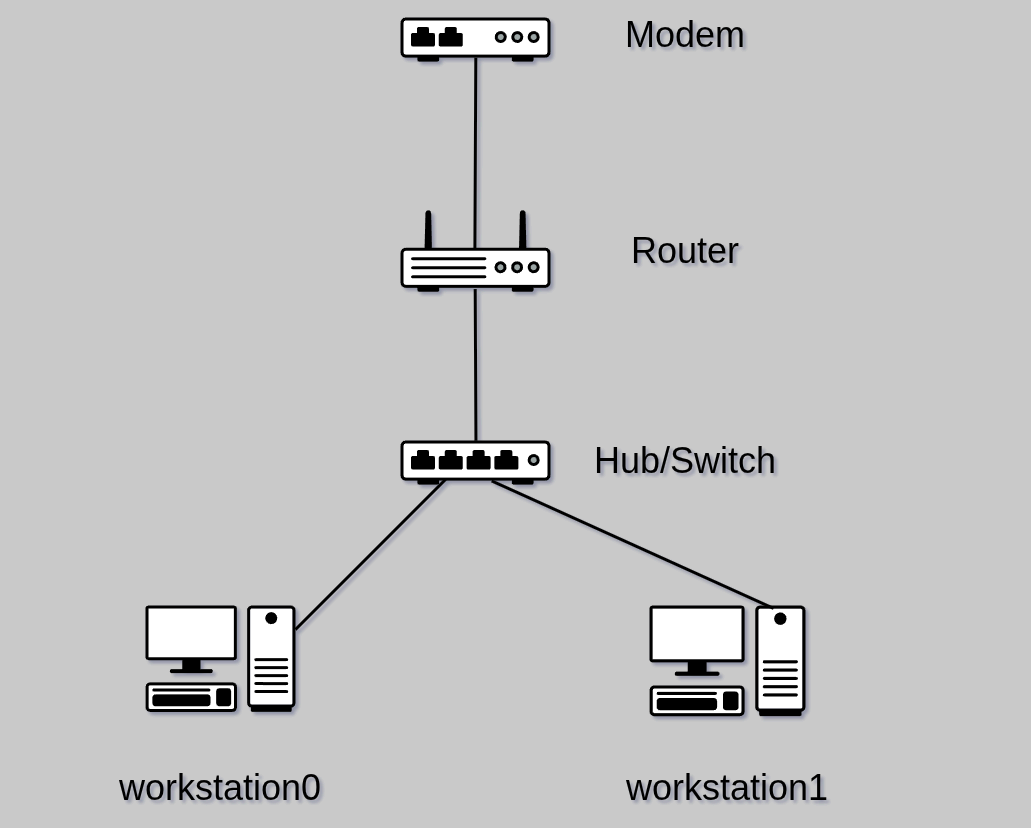
A hub is merely a simple way to split out the ethernet cables. A hub is often called a switch. As we’ll learn in later courses, a switch can sometimes have more features than a hub. Either term is fine, however.
A router is special. This is a computer that is specifically designed to ‘route’ data on a network. In our example, the router is actually creating a network and assigning Internet Protocol (IP) addresses to each device that ‘plugs in’ to this network. We’ll talk more about this in the future, but for now just understand that an IP address is a unique numerical identity, and the router is in control of the numbering process and takes the first address.
You may or may not also have a modulator-demodulator, or modem. This is a device that changes a signal from digital to analog or vice versa when necessary. In a newer setting, you may instead have a fiber optic termination. If you have either of these, they may be ‘upstream’ (closer to your service provider) from your router. Confusingly, you may have a modem/router combo device, which usually also contains a switch. So if you only have one device, it is probably doing several jobs. For the rest of our example, we assume an all-in-one home router/modem/switch.
This network will be one of the most common home IP schemes, 192.168.1.xxx, where xxx is the host’s address. So the router will be 192.168.1.1, the hub does not have an IP, and just passes all traffic blindly, and the two desktop hosts will be 192.168.1.2 and 192.168.1.3.
Note
The hostnames of the devices are visible on the network, and are mapped to the corresponding IP address. This includes the router - we’ll say its hostname is
Router. If you use an external hub to add more ethernet devices, it has neither an IP nor a hostname, and is invisible as far as IP is concerned.
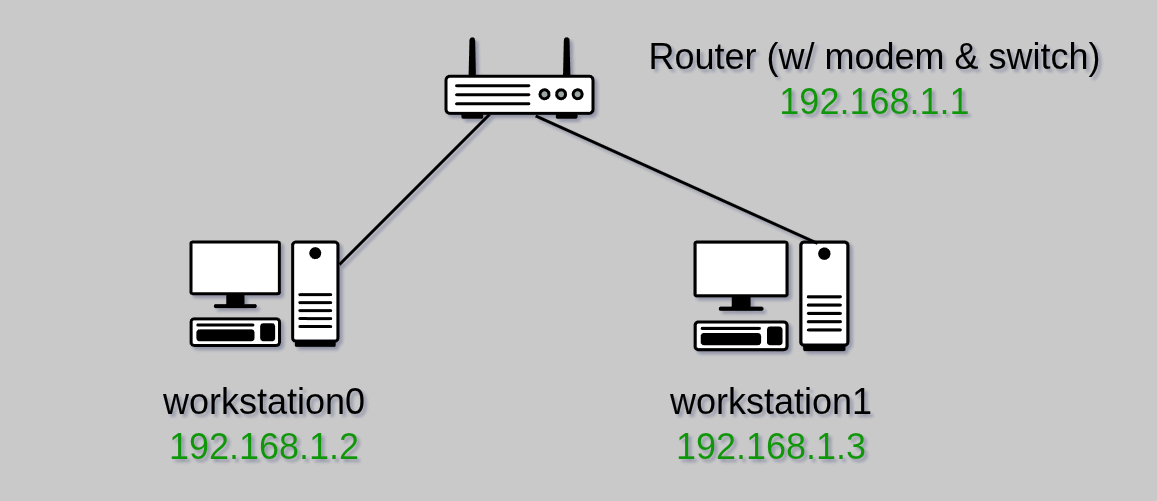
A LAN can expand a lot from here, and you likely have many more devices on your own home/office LAN. This may include desktops, laptops, mobile devices, printers, cameras, security devices, and much more. Many of these may be connected via a wireless radio, which is often a feature included in a modern router, or a separate device ‘downstream’ (closer to your devices) from the router. All devices on the network will be assigned an IP address by the router.
Wide Area Network (WAN)
A Wide Area Network (WAN) is essentially a network of networks. You may see other names for this, such as a Metro (MAN) or Campus (CAN) Area Network. Some even use the term Personal Area Network (PAN) to describe the various connected devices to an individual. For our purposes, we will generally use the term WAN, and we will usually be referring to the Internet.
There is an important distinction between a LAN and WAN that you will generally not see emphasized. We’ll use your home’s LAN as an example. This is a private space, and as long as you aren’t using it to cause loss, injury, or harm to other living beings, then it ought to remain that way. Internet Service Providers (ISPs) will often provide you with equipment, and sadly, some seem to think it is acceptable to give themselves access to your network for their own purposes. Luckily this is easily defended by using your own equipment, which we will cover in depth in a later course.
Here we illustrate a more complete LAN and its relationship to the WAN which we call The Internet.
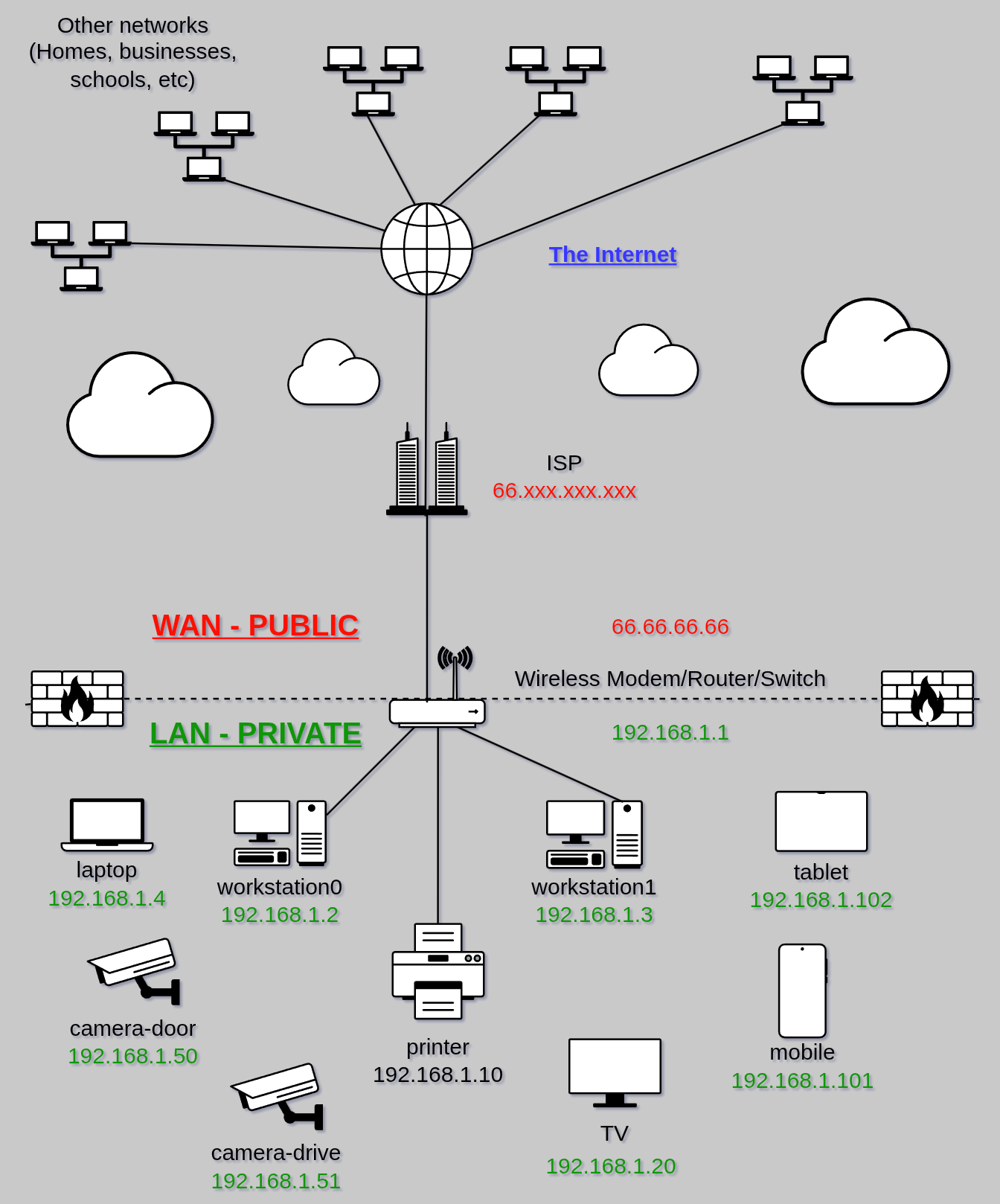
From the top-down, we notice the LANs of other Internet-connected individuals and organizations. As the name implies, The Internet is simply a series of ‘interconnected networks.’ Your connection to this is typically through your Internet Service Provider (ISP). We’ll talk much more about how this came to be and what can be done in the “evil ISP” scenario in another course. From here we reach the WAN/LAN segregation to your network. This line is sometimes called a DMARC (demarcation) and your router acts as a firewall between the public world (WAN), and your private world (LAN). A firewall is also a specific type of network defense tool - again, covered in future courses.
Important
Notice that the router in this example has two IP addresses. These identify two different interfaces, one is the basis of your LAN (192.168.1.1), and one is assigned and controlled by your ISP (66.66.66.66). This assigned IP is publicly viewable by any party you connect with in the WAN, whereas the IP addresses within your LAN are private and not used or seen on the WAN.
A common theme at Neuromancy is that the digital world mirrors the physical. Just like you wouldn’t let a company influence or control your heating, stove, or door locks, there’s no reason to let one influence or control your personal devices and connections. Your router is the front door to your network, and that is where an ISP’s business ends, and your privacy begins.
EXERCISE
Open a terminal and enter the following command:
ip aYou will see something like this:
You may have several interfaces, but probably at least two. In this example, the second interface is an ethernet interface, and below it you can see the local IP address (
192.168.122.181- don’t worry about the/24for now).Next enter the following command:
curl icanhazip.comThis is your public IP address, which is known to any node/network you connect to, and can reveal some basic information about you. If you use a VPN, this address will belong to your VPN provider, providing you some additional privacy. We will cover VPNs extensively.
curlis a command which sends an HyperText Transfer Protocol (HTTP) request to a website and displays the response. We’ll learn more about how the web works in future. If you visit the website icanhazip.com in your browser, you will see the same information displayed.
Basic Networking Relationships
Finally we need to understand some basic networking concepts, specifically, how devices relate to one another. These relationships can happen within your LAN, from a device to a distant Internet-connected device, or between networks more generally.
Centralized, Decentralized, Distributed
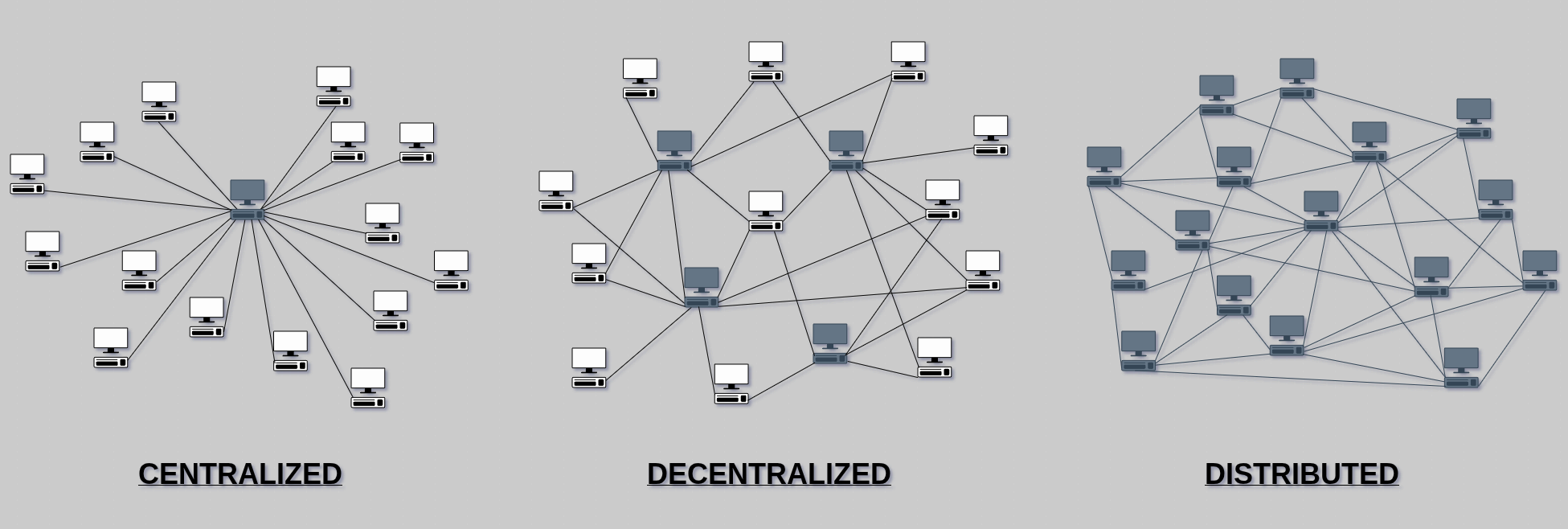
One of the most important concerns is the general relationship of nodes in a network. Network layouts will typically fall along a scale from centralized to distributed.
Centralized networks depend entirely on one node for all communications. This is not very resilient, but is highly efficient. Obviously if the central node goes down, all other nodes are left unable to communicate. However, the transmission of a communications can be managed entirely by one entity, so no cooperation is required to move a message where it needs to go. Decentralized networks depend on a few nodes, and exchange some efficiency for more resilience. Some cooperation is required to deliver messages, but if one of the main nodes goes down, the others will still ensure delivery. Finally is a completely distributed model, where nodes will use any number of nearby nodes to communicate to a remote node. This is entirely resistant to the loss of even most nodes, but routing efficiency becomes challenging.
Clients, Servers, Peers
To this point we have used the terms host or node to represent any computer in a network. Let’s differentiate these a bit.
- Client - A node requesting data or using a service
- Server - A node accepting requests for (serving) data, or providing (hosting) a service
- Peer - A node which both requests and serves data, or provides one end of a mutually beneficial service
Any node can be a client, server, or peer, and even play several roles at once depending on the software and networking it is configured with. Next, we’ll briefly touch on how these roles look in practice.
The Client-Server Model
The client-server model is currently the most common style of communication on The Internet. As shown below, this model means that data or a service is accessed from a server, and clients can request access to that data or service. Whenever you hear the term “the cloud,” this is just referencing a someone’s server. There is nothing inherently wrong with this model. In fact it is efficient, since data/services can reside with just one server and be made available to many clients.
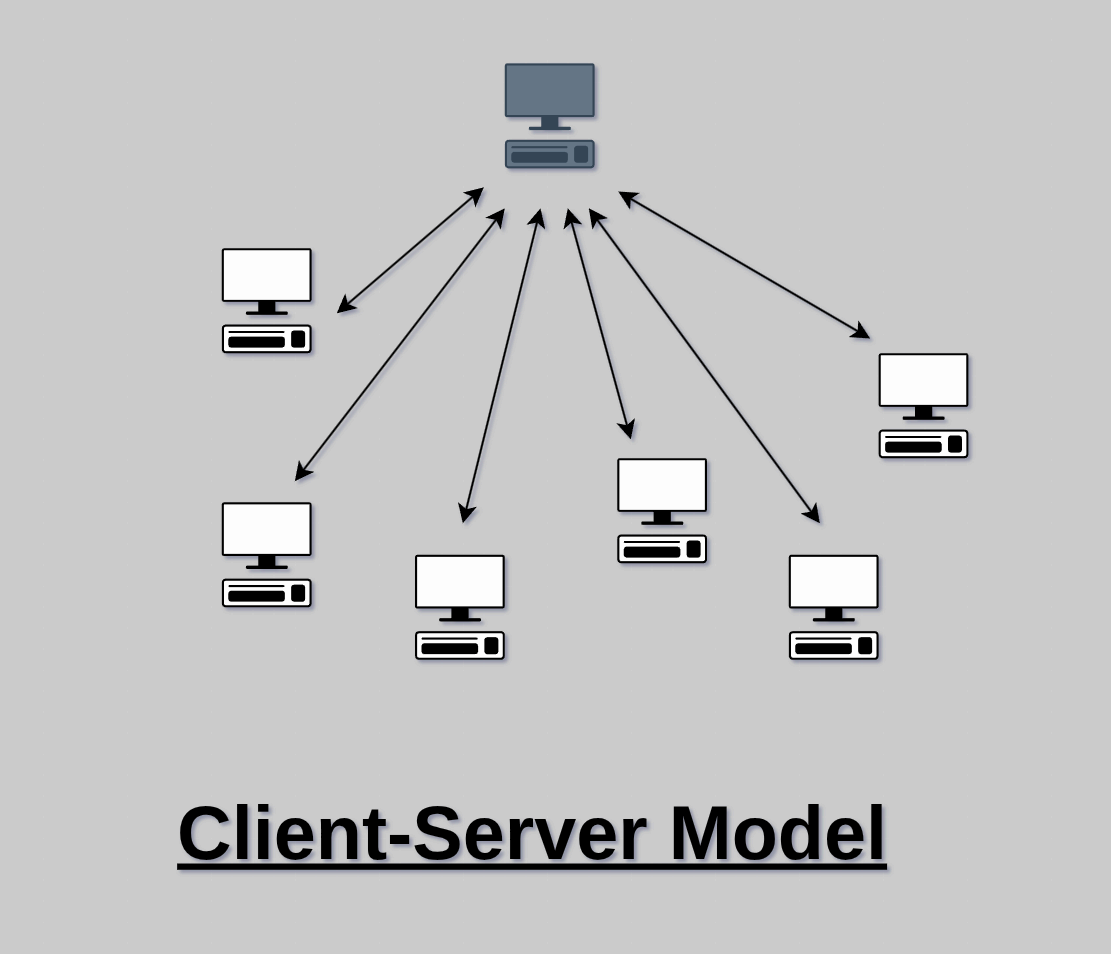
The trade-off is that the server has all the power in this relationship. If poorly managed, or otherwise untrustworthy, a server can present a number of risks to their clients. If entrusted with client data, that data is at risk of loss, restricted access, or being shared/sold with third parties without informed consent. If running a service, the server’s owner has supreme authority over that service, and if malicious, can potentially snoop on or manipulate client interactions.
The idea here isn’t to scare you into never using someone else’s server again, but to understand the model and the risks. Just like visiting someone’s property in the real world, a beneficial operator can provide great value from a server. You are likely connected to a Neuromancy server right now, of course. What we do want to do however, is start to understand who really owns our data and tools, and where it makes sense, regain control over them.
Peer-to-Peer (P2P) Model
Peers, as the name implies, are nodes that share an equal status. They often both serve and acquire data simultaneously. For example, when using a file-sharing protocol like BitTorrent, peers will download chunks of data of a file while simultaneously uploading any parts they already have. Peer-to-peer relationships are egalitarian and P2P networks are extremely resilient once bootstrapped.
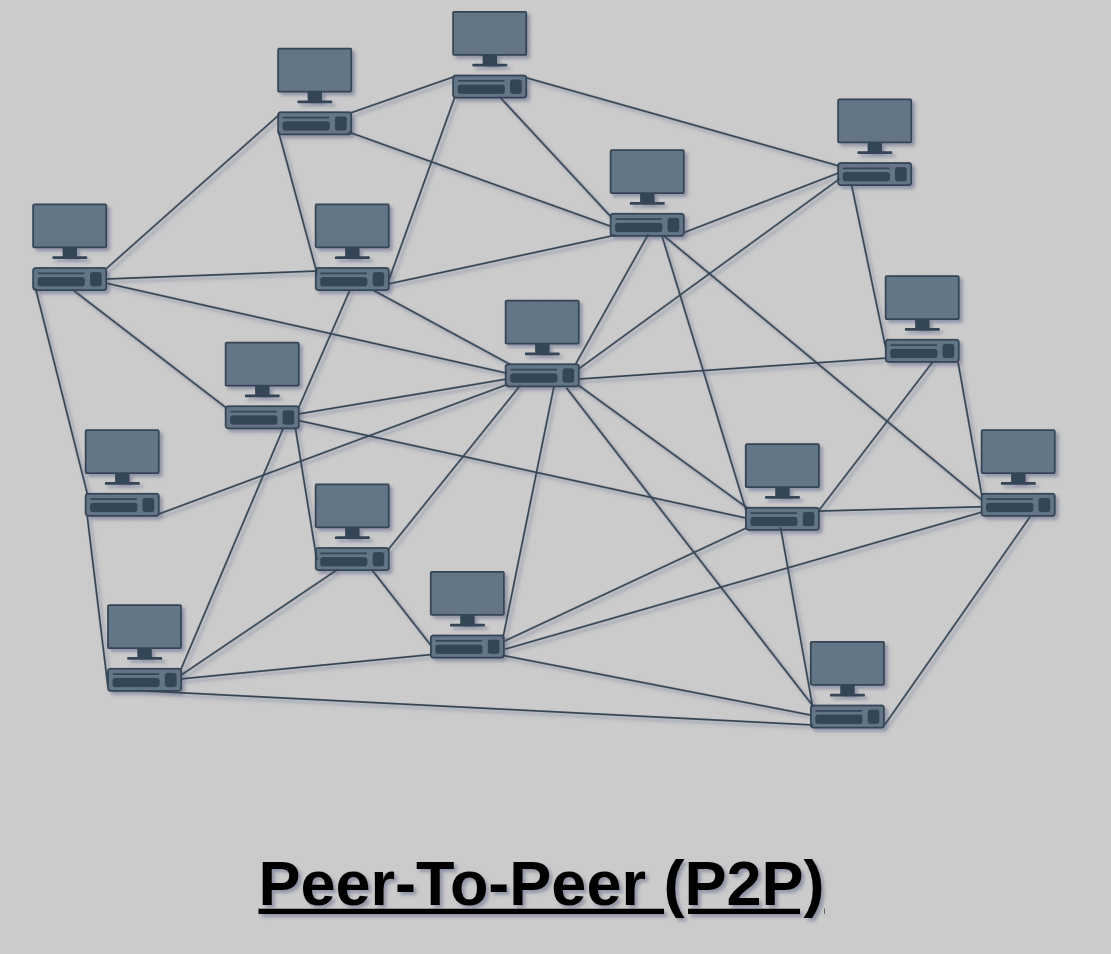
As you can see, this is essentially the completely distributed model we examined earlier. We will be learning and utilizing many Peer-to-Peer technologies going forward.